|
|

Installing Language Packs and Input Method Editors on Win 98*Please prepare your Windows 98 CD-ROM. If you are installing Asian Languages follow the link below and download the language packs seperately. Western Languages / Asian Languages / Language Specific Western LanguagesStep 1: Once you switch on your computer click on the START button and select CONTROL PANELS.
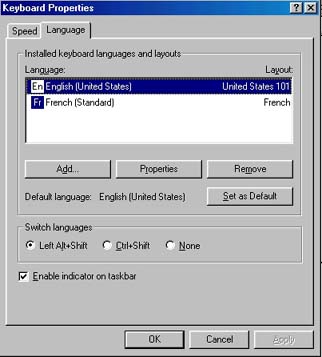
Step 2: Choose KEYBOARD and select the LANGUAGE tab.
Step 3: Click on ADD and select language from drop down menu, then click OK.
Step 4: Click on OK and your Operating System (OS) will install the software automatically.* * Insert the Windows 98 CDRom if prompted. This will complete the installation.
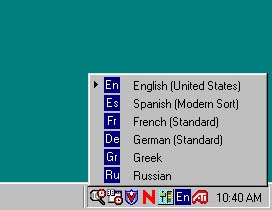
Step 5: Click on the EN icon in your system bar found on the bottom right hand corner of your screen.
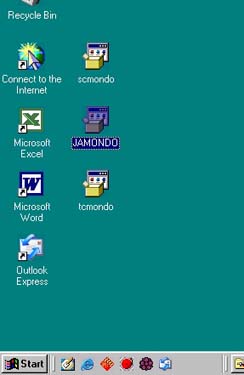
Asian LanguagesStep 1: Download the Input Method Editor (IME) from Microsoft.com or here to your Desktop.
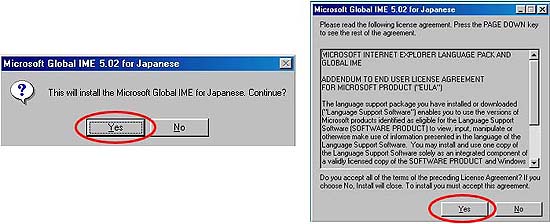
Step 2: Double click on downloaded object. Click YES for Global IME installation and license agreement.
Step 3: After the installation process is completed the computer will prompt you to reboot. Click YES. Step 4: Open a Microsoft program such as Microsoft Word. Step 5: Click on the EN icon on the bottom right corner and choose JA. Language Specific FunctionsChinese / French / German / Greek / Hebrew / Japanese / Latin / Russian / Spanish |
|||||||||||||||||||


Please send comments or suggestions to Carly Born. |